
Most cost-benefit analyses that reach my desk fail on the same line. They compare the new option against nothing at all, so every dollar of benefit looks free. Overruns and slow adoption routinely erode 20% to 30% of projected benefit, and a case with no baseline has no cushion for either.

Before You Copy: Timing, Format and the One Rule That Matters
Every template rests on one rule: a stated source behind every number, because an unsourced figure won’t survive a second meeting.
The work usually runs in five steps. State the objective, list mutually exclusive alternatives, set one time horizon, record your assumptions, then compare and stress-test the options. Build it before the contract or offer letter is drafted, while the answer can still be no. Every template opens with four header fields: decision, scope, period and owner.
| Template | Best format | Use when |
|---|---|---|
| 1. Software or IT purchase | Excel/Sheets | Replacing or upgrading a system |
| 2. Hire vs. outsource | Excel/Sheets or Word | Adding headcount or a vendor |
| 3. Equipment or automation | Excel/Sheets | One large spend, savings over years |
| 4. Subscription vs. one-time | Excel/Sheets | Same tool, two payment structures |
| 5. Executive summary | Word or one slide | Asking someone to approve |
Template 1: Software or IT Purchase With a Do-Nothing Baseline
Option 0 is always do nothing. According to the Australian Government Office of Impact Analysis, public-sector guidance requires at least three options, one of which must be non-regulatory, the government version of “keep doing what we do now.”.
DECISION: Should [Company] replace [current system] with [new system]?
SCOPE: [departments/users affected] PERIOD: [start] to [end], [3-5] years
OWNER: [name, title]

OPTIONS
Option 0: Do nothing. Keep [current system]; include its rising costs.
Option 1: Upgrade [current system] to [version].
Option 2: Replace with [vendor/product].

COSTS BY YEAR, per option | Year 0 | Year 1 | Year 2 | Year 3 | Total
Implementation | $[ ] | $[ ] | $[ ] | $[ ] | $[ ]
Training, incl. staff hours | $[ ] | $[ ] | $[ ] | $[ ] | $[ ]
Data migration / cutover | $[ ] | $[ ] | $[ ] | $[ ] | $[ ]
Subscription / maintenance | $[ ] | $[ ] | $[ ] | $[ ] | $[ ]
Compliance and security | $[ ] | $[ ] | $[ ] | $[ ] | $[ ]
Opportunity cost | $[ ] | $[ ] | $[ ] | $[ ] | $[ ]
Contingency, [10-20]% | $[ ] | $[ ] | $[ ] | $[ ] | $[ ]
TOTAL COSTS | $[ ] | $[ ] | $[ ] | $[ ] | $[ ]
When to use it: any system change where waiting still costs money. The opportunity cost row is what the money and team hours would earn elsewhere, covered in “opportunity cost.”
Template 2: Hire vs. Outsource, Including Costs Nobody Writes a Check For
A cost counts if it consumes something you could have used elsewhere, whether or not anyone cuts a check.
DECISION: Hire [role] in-house vs. contract [vendor] for [scope]
PERIOD: [12] months OWNER: [name]

DIRECT COSTS
[ ] Salary or contract fee: $[ ]
[ ] Benefits and payroll taxes, [ ]% of salary: $[ ]

HIDDEN COSTS
[ ] Manager oversight: [hrs/week] x [loaded hourly rate] x [weeks]
[ ] Recruiting: fees, ads, interview hours: $[ ]
[ ] Ramp-up: [months] at [ ]% productivity x monthly cost
[ ] Overhead and equipment: seat, licenses, IT, laptop: $[ ]
[ ] Diverted work: [senior staff hrs] x [billable or loaded rate]

LOADED HOURLY RATE = (salary + benefits + taxes) / [1,800] productive hours
Worked example, illustrative: a marketing agency weighs an in-house media buyer at $70,000 against a $110,000 contract.
- Salary plus 25% benefits and taxes: $87,500.
- Oversight, 6 hours a week at $90 for 48 weeks: $25,920.
- Recruiting $8,000; ramp-up, 3 months at 50%: $8,750.
- Overhead $6,000, equipment $2,500.
- Strategist training time, 4 hours a week for 12 weeks at $120: $5,760.
In-house: $144,430. The contract plus 2 hours a week of oversight ($8,640): $118,640. Contract wins year one. Funny how the cheaper salary ends up the pricier choice.
When to use it: before any offer letter or vendor agreement.
Template 3: Equipment or Automation With NPV, BCR and Payback
You calculate a cost-benefit analysis by discounting each year’s benefits and costs to present value, then comparing them two ways. The difference is NPV. The ratio is BCR. Payback adds timing.
INPUTS
B2 Discount rate: [ ]%
B3 Upfront cost, Year 0: $[ ]
C5:G5 Annual benefits, Y1-Y5: $[ ]
C6:G6 Annual costs, Y1-Y5: $[ ]

FORMULAS
Net annual benefit (C7): =C5-C6
PV of benefits: =NPV(B2,C5:G5)
PV of costs: =B3+NPV(B2,C6:G6)
NPV: =PV benefits - PV costs
Benefit-cost ratio (BCR): =PV benefits / PV costs
Cost-benefit ratio: =PV costs / PV benefits
Payback, years: year cumulative net turns positive, plus
(unrecovered amount / that year's net benefit)
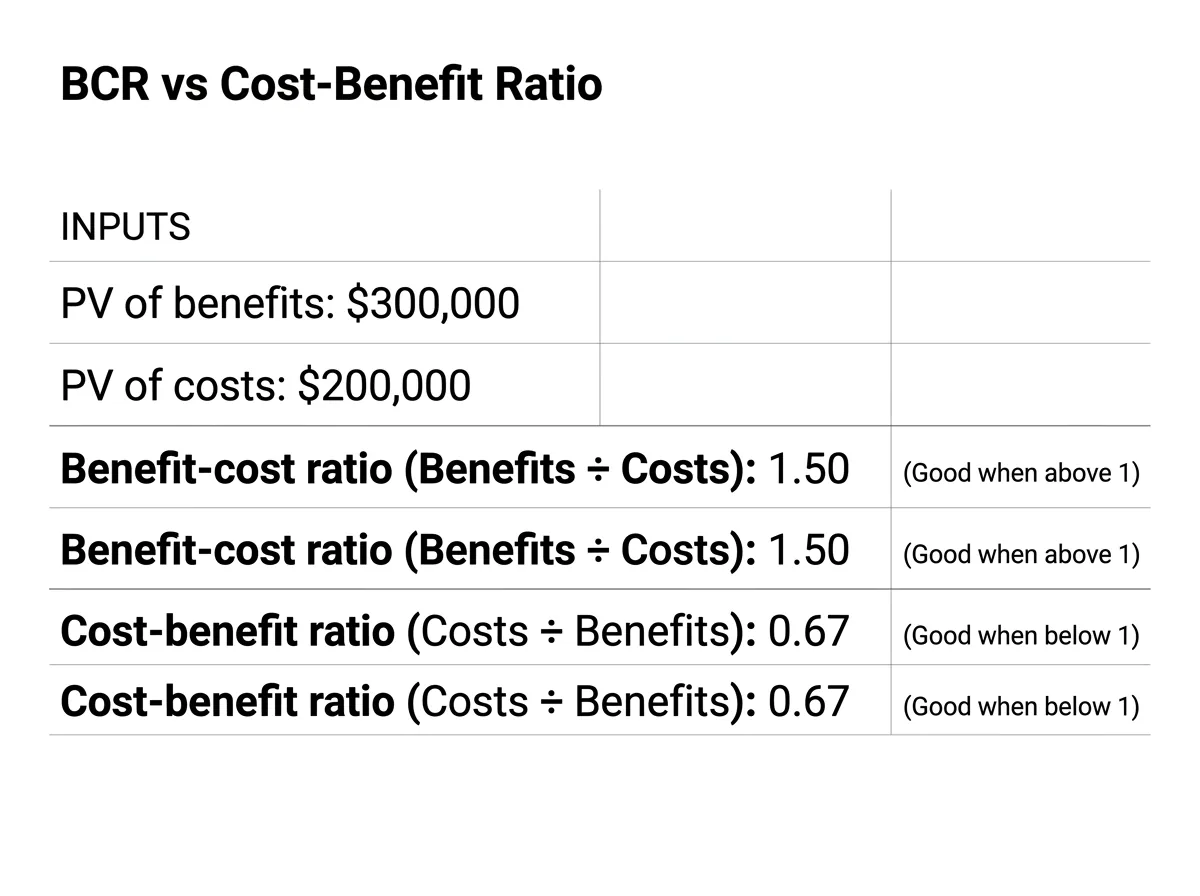
The ratio direction trap. Two ratios share nearly the same name. With PV of benefits $300,000 and PV of costs $200,000:
| Ratio | Formula | Result | Good when |
|---|---|---|---|
| Benefit-cost ratio | Benefits ÷ Costs | 1.50 | Above 1 |
| Cost-benefit ratio | Costs ÷ Benefits | 0.67 | Below 1 |
Read that 0.67 as a BCR and a good project dies in committee. Label the ratio every time.
ROI and BCR reward small, efficient bets. NPV rewards absolute dollars. Pick the metric before you see the answers, or you’ll quietly pick the one that flatters the project you already like.
The discount rate comes from your cost of capital, covered step by step in “cost of capital,” and the depreciation side sits in “capital expenditures.”
When to use it: a large upfront spend with savings spread over several years.
Template 4: Subscription vs. One-Time Purchase Over Several Years
Lay the options out in year columns with a cumulative net row, because timing is where these decisions flip.
OPTION [A/B]: [name] | Year 0 | Year 1 | Year 2 | Year 3
Benefits | $[ ] | $[ ] | $[ ] | $[ ]
Costs | $[ ] | $[ ] | $[ ] | $[ ]
Net | =B2-B3 | ... | ... | ...
Cumulative net | =B4 | =B5+C4 | ... | ...
Discount factor @ [r]% | 1.000 | =1/(1+r)^1 | =1/(1+r)^2 | =1/(1+r)^3
PV of net | =B4*B6 | ... | ... | ...
Worked example, illustrative: a SaaS company needs a data tool worth $40,000 a year in saved engineering time. Option A is a $24,000 yearly subscription plus $5,000 setup. Option B is a $55,000 perpetual license plus $5,000 a year maintenance.
| Metric | A: Subscription | B: License |
|---|---|---|
| Cumulative net, Year 3 | $43,000 | $50,000 |
| Payback | About 4 months | About 1.6 years |
| NPV at 4% | $39,402 | $42,129 |
| NPV at 12% | $33,429 | $29,063 |
Payback says A. At 4%, NPV says B. At 12%, A wins again, with the crossover near 7%. A company borrowing on a credit line should probably subscribe.
When to use it: the same capability is offered as rent or purchase.
Template 5: One-Page Executive Summary and Recommendation Wording
Australian Government impact analysis requires a formal cost-benefit analysis for proposals with a substantial or widespread impact on the economy. The owner’s version fits on one page.
DECISION REQUESTED: [Approve / reject / defer / pilot] [option] by [date]

Option 0 Option 1 Option 2
PV of costs $[ ] $[ ] $[ ]
PV of benefits $[ ] $[ ] $[ ]
NPV @ [ ]% $[ ] $[ ] $[ ]
BCR [ ] [ ] [ ]
Payback [ ] [ ] [ ]

PREFERRED OPTION: [ ]
BREAK-EVEN: Holds unless [key assumption] falls below [threshold]
TOP RISK: [ ]
RECOMMENDATION
Approve Option [1] over a [5]-year period. It produces discounted
benefits of $[X] against discounted costs of $[Y], an NPV of $[Z] and
a BCR of [R]. The case holds if implementation runs [X]% over budget
or annual benefits fall [Y]%. Approval is conditional on [confirming
vendor security review / signed pilot results / hiring by date].
A BCR above 1 can still get rejected. The cash may leave before the benefit arrives and strain a covenant, the risk may be lopsided, or the team may lack capacity. Say which constraint you checked.
If you’d like a second set of eyes on a summary before it goes to your board or bank, a short call with Morgan Fractional CFO is a reasonable place to test it.
Annotated Examples: Assumptions Log and Sensitivity Test
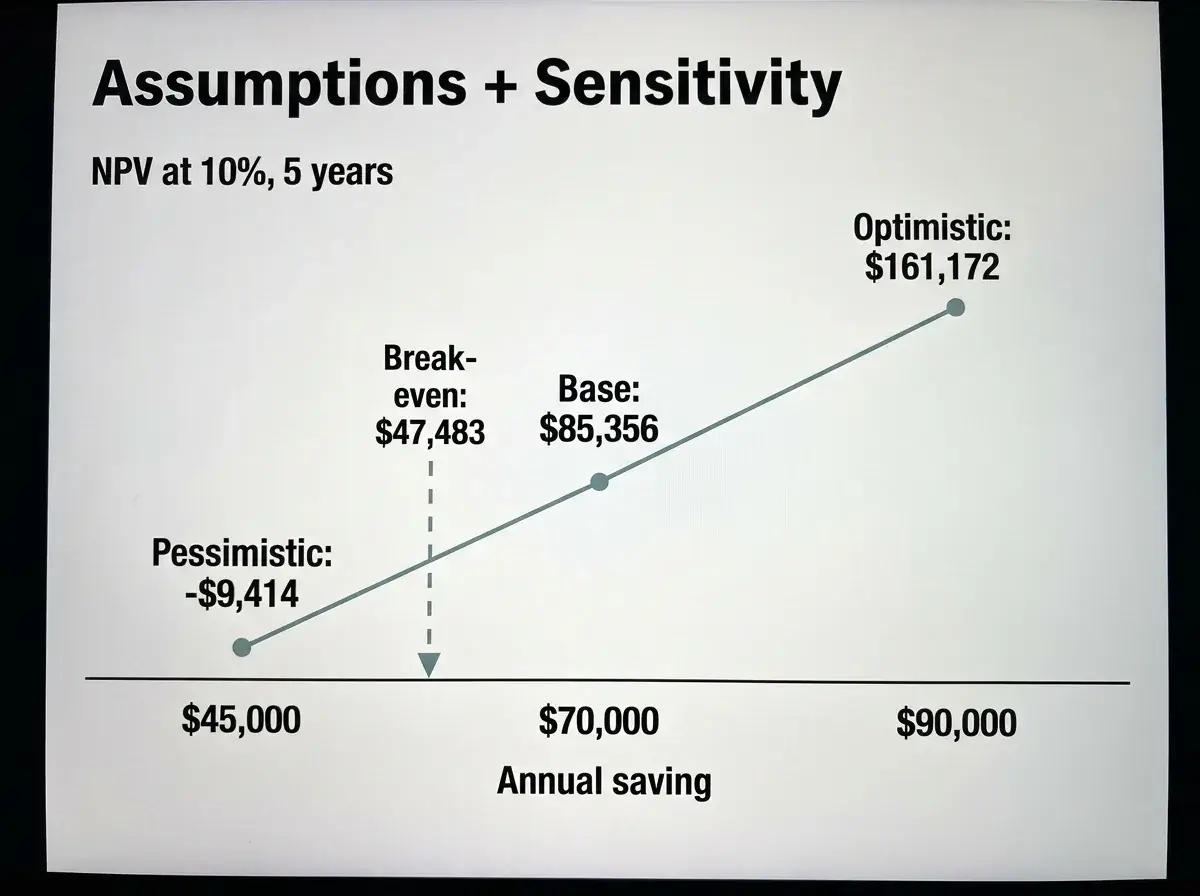
Log each number with a source and a range, then find the value where the answer flips.
Example 1, illustrative: distributor assumptions log for pick-to-light automation
Assumption Value Unit Source Confidence Range System cost $180,000 one-time Vendor quote High ±10% Labor saving $70,000 per year 8-week time study Medium $45k-$90k Useful life 5 years Asset policy High 4-7 Discount rate 10% annual Financing rate High 8%-12% Why it works: the riskiest input, labor saving, has the widest range and a named source.
Example 2, illustrative: base, pessimistic and optimistic cases
Case Annual saving NPV at 10%, 5 years Pessimistic $45,000 -$9,414 Base $70,000 $85,356 Optimistic $90,000 $161,172 Break-even: $47,483 a year, so one testable question decides it: can the warehouse save $47,500 a year?
At 800 Travel Systems, where I was an executive, we ran daily KPIs on staffing versus schedule, call-abandon and conversion by agent. Daily inputs like those would feed the labor saving row of Example 1 and shrink its $45k-$90k range.
Beside the math, score benefits you can’t price from 1 to 5 against written criteria. If nothing can be priced, use cost-effectiveness: $180,000 for 12,000 fewer mis-picks over five years is $15 per error avoided.
What to Avoid in a Cost-Benefit Analysis
Most failures come down to double counting, savings that never reach cash and unsourced inputs.
| Don’t | Do |
|---|---|
| Count revenue, productivity and savings for the same hours | Assign each benefit to one category only |
| Book labor savings with no headcount or overtime cut | Count only hours that reduce payroll or free billable capacity |
| Count gross revenue as benefit | Use contribution margin |
| Paste vendor ROI projections | Discount them or replace with your own pilot data |
| Use a discount rate with no source | Tie it to financing cost or a written hurdle rate |
| Mix nominal cash flows with a real rate | Keep both nominal or both real |
| Compare a 3-year option to a 7-year one | Normalize the period or add residual value |
| Skip decommissioning and disposal | Add an end-of-life row |
The main weakness of a CBA is false precision. An NPV of $127,432 implies accuracy the inputs can’t support. Round outputs, show the range, run the sensitivity test from the annotated examples and let the ranking of options carry the decision.
Make It Your Own
Trim before you fill in. A $5 million company doesn’t need a government-grade workbook.
- Pick one template. Most owners need Template 2 or 4, plus Template 5 for the ask.
- Delete rows that don’t apply. A cloud tool has no disposal cost.
- Set the discount rate from what money actually costs you. If your credit line runs at 9% and new projects must clear 12%, run the base case at 12% and test 9%. If the financing choice is still open, “line of credit vs term loan” settles it first.
Some decisions carry more weight than a spreadsheet should hold alone: the next hire, a pricing change, how much cash growth will consume. For those, Morgan Fractional CFO runs a CFO Decision Diagnostic that delivers a 13-week cash and working-capital view, a margin and profitability map and a prioritized 90-day action plan, within 10 business days of receiving complete data. Book a 15-minute call to describe the decision and see whether it fits.
Frequently Asked Questions
What is CBA used for?
CBA turns a spend, hire or system change into a yes or no. Its strength is alignment, since owners, lenders and managers argue over one set of written assumptions. When most of the value resists pricing, multi-criteria analysis, which scores options against weighted criteria, fits better. When the future is uncertain, scenario planning tests a few distinct outcomes.
What is a good benefit-cost ratio for a software or technology project?
I want roughly 1.3 or higher on software before approving. Overruns and slow adoption eat into projected benefit, and a 1.05 ratio leaves no room for either.
How many years should a CBA cover?
Cover the shorter of the asset’s useful life or the vendor’s support commitment, and hold every option to the same period. Software usually runs three to five years, while a warehouse system or long equipment lease may need ten.
What are some examples of financial decisions that need a CBA?
Hiring versus outsourcing, buying versus leasing equipment, replacing an ERP or CRM and opening a second location all qualify. My test: if the spend exceeds a month of operating cash or locks you in past a year, write it up.
Is a cost-benefit analysis calculator good enough, or do I need a spreadsheet?
An online calculator handles one option and one rate, which is fine for a quick screen. It can’t hold a baseline, sourced assumptions or a break-even test. Use it to decide whether an idea deserves a spreadsheet.
What are the main types of financial decisions?
Finance texts group them into four types: investment (what to buy or build), financing (debt or equity), dividend (what to pay out) and working capital (how much cash to tie up). Templates 1, 3 and 4 handle investment choices, while Template 2 covers the hire or outsource calls that shape working capital.